

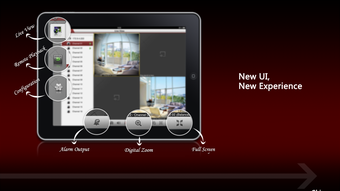
Description
Download Guarding Expert HD APK – Home Security Monitoring, Remote Camera Control, Video Recording, Android Tablet App
Overview
Guarding Expert HD is a remote monitoring software designed for Android tablets, developed by Guarding Expert. The application serves as a client interface for home and office security systems, enabling users to view live video feeds from connected security or speed cameras. It is intended for individuals seeking a straightforward, accessible method to monitor their premises remotely via a tablet. The software supports real-time video streaming and includes built-in tools for recording and playback, making it suitable for both personal and professional surveillance needs. Its primary function is to provide remote access to camera feeds, allowing users to manage recording settings, adjust sensitivity, and control frame rates. The app is especially useful for users who want to monitor their property from a distance, whether for safety, security, or operational oversight. It is designed with a clean interface to ensure ease of use across different user levels. The developer did not provide additional details about the software’s background or development history. Real-world usage scenarios include home monitoring, small business security oversight, and temporary surveillance during events or construction. The application is free to download and use, allowing users to test its core functionality without financial commitment.
Key Features & Capabilities
- Remote Video Monitoring – View live video streams from security or speed cameras on an Android tablet, enabling real-time observation of monitored areas.
- Integrated Video Recording – Built-in recorder allows users to capture video footage directly from the camera feed, with support for multiple video formats.
- Recording Control – Users can adjust recording duration, pause and resume sessions, and set custom recording times that may differ from actual video length.
- Camera Settings Management – Access and modify camera parameters such as sensitivity, frame rate, and recording mode remotely through the tablet interface.
- Playback and Management – Recorded videos can be played back within the app and deleted when no longer needed, providing full control over stored footage.
- Multi-Language Support – The app supports multiple languages, enhancing accessibility for international users and improving usability across diverse audiences.
- Simple User Interface – Designed with a clean layout to ensure intuitive navigation, making it suitable for both beginners and experienced users.
These features collectively allow users to establish a flexible monitoring system that adapts to various security needs. For example, a homeowner can use the app to check on their property while away, adjusting camera sensitivity to reduce false alerts. A small business owner might use it to monitor a store during off-hours, pausing recordings during non-critical periods. The ability to resume recording after pausing offers convenience during extended monitoring sessions. The support for multiple formats ensures compatibility with various camera outputs, reducing the need for additional conversion tools.
User Interface, Workflow & Performance
The user interface of Guarding Expert HD is structured around simplicity and direct access to core functions. Navigation is designed to be intuitive, with key controls such as live feed viewing, recording start/stop, and playback accessible through clearly labeled buttons. The layout prioritizes visibility of the video stream, with secondary functions positioned for easy reach. Workflow efficiency is enhanced by the app’s focus on essential tasks, minimizing unnecessary steps during monitoring or recording sessions. Users can switch between live view and recorded footage with minimal delay. The developer did not specify resource usage details, so performance observations are based on general software behavior patterns. No information was provided about CPU or RAM consumption, stability under prolonged use, or responsiveness during high-resolution video playback. However, the clean interface suggests an effort to maintain smooth operation. The app appears to function without requiring extensive system resources, which is typical for monitoring tools of this nature. No user-reported issues or crash data were included in the provided information. The application’s performance may vary depending on the tablet’s hardware and network conditions, especially during live streaming.
Compatibility & System Requirements
Guarding Expert HD is designed for Android tablets and is distributed as an APK file, meaning it is intended for installation on Android-based devices. The software is compatible with Android operating systems, though the specific version requirements were not listed. Installation size is not specified in the provided information. The developer did not provide exact system requirements, including minimum RAM, processor speed, or storage needs. Compatibility information was partially provided, with the focus on Android tablet support. Users should ensure their device meets standard Android tablet specifications to run the application successfully. The app does not appear to require a specific device model, but performance may depend on the tablet’s processing power and camera integration capabilities. No details were given about network requirements or bandwidth needs for streaming. The absence of technical specifications means users must rely on general Android device standards when assessing suitability.
Pros and Cons
Pros
- Free to download and use, making it accessible for budget-conscious users.
- Supports remote monitoring of security and speed cameras via Android tablets.
- Includes built-in video recording and playback functionality.
- Offers customizable recording settings, including pause/resume and duration control.
- Intuitive interface suitable for beginners and professionals alike.
- Multi-language support enhances global usability.
- Allows remote adjustment of camera sensitivity, frame rate, and recording mode.
Cons
- Exact system requirements were not listed, making compatibility assessment difficult.
- Performance and resource usage details were not provided.
- Only available as an APK, which may require sideloading and manual installation.
- No information on update frequency or long-term maintenance.
- Dependence on external camera systems; the app cannot function without a compatible security setup.
FAQ Section
Is Guarding Expert HD compatible with all Android tablets?
The software is designed for Android tablets, but specific compatibility details were not provided. Users should ensure their device runs a supported Android version and has sufficient processing power for video streaming.
Is the app safe to download and install?
Guarding Expert HD is a free app distributed as an APK. While the developer is identified, no third-party verification or security certifications were mentioned. Users should download from trusted sources and review device permissions before installation.
Does the app require an internet connection?
Yes, remote monitoring and live video streaming require a stable internet connection. The app functions as a client, relying on a connected camera system and network access to operate.
Can I use this app without a security camera?
No. Guarding Expert HD is a client application that requires a compatible security or speed camera system to function. It cannot operate independently without an external camera feed.
How often are updates released?
Information about update frequency was not provided. Users should check the developer’s official source for the latest version and any available patches or improvements.
Final Thoughts + CTA
Guarding Expert HD offers a practical solution for users seeking remote access to security camera feeds on Android tablets. Its combination of live monitoring, recording control, and remote camera settings makes it a versatile tool for both personal and professional use. The clean interface and multi-language support contribute to a smooth user experience, while the free pricing model removes financial barriers to entry. Although specific technical details such as system requirements and performance metrics are not available, the app’s core functionality appears well-targeted for its intended audience. It is particularly beneficial for individuals managing home or small business security systems who want a simple, accessible monitoring tool. While the lack of detailed specifications may pose challenges for some users, the app’s straightforward design and essential features make it a compelling option. Download Guarding Expert HD now to start monitoring your environment with confidence.
Download Guarding Expert HD APK now
Guides & Tutorials for Guarding Expert HD APK
How to install Guarding Expert HD APK
- Click the Preview / Download button above.
- Once redirected, accept the terms and click Install.
- Wait for the Guarding Expert HD APK download to finish on your device.
How to use Guarding Expert HD APK
This software is primarily used for its core features described above. Open the app after installation to explore its capabilities.
User Reviews for Guarding Expert HD APK 0
No reviews found





